sábado, 16 de janeiro de 2016

Event log error 13: the data is invalid

Service Won’t start: Error 13: The data is invalid.


On Windows server 2012, sometimes a windows service behaves unexpectedly or after a reboot and does not starts giving an error:


I just renamed the HKEY_LOCAL_MACHINE\SOFTWARE\Policies\Microsoft\Windows\Eventlog key to HKEY_LOCAL_MACHINE\SOFTWARE\Policies\Microsoft\Windows\Eventlog_old and the Event log service was started successfully.

I hope it helps someone ! Enjoy and leave a message if it helped.

quarta-feira, 13 de janeiro de 2016

Linux - basic commands

Working with files and directories


echo - display a line of text


hostname - show or set the system's host name


whoami - print effective userid


pwd - print name of current/working directory


mkdir - make directories

cd - Enter to the folder


rmdir - remove empty directories


head - output the first part of files


PS1 (Prompt String 1) - PS1 prompt which is a inbuilt shell variable


Bash History Commands


How to shows your default shell


od - dump files in octal and other formats


tac - concatenate and print files in reverse


tail - output the last part of files


wc - print newline, word, and byte counts for each file


mv - move (rename) files


segunda-feira, 19 de janeiro de 2015

How to update nvidia`s driver for graphic card on Ubuntu


From terminal tool like root, type the commands below (one at a time):


sudo apt-get update
sudo apt-get install nvidia-current 
 

After this, reboot the machine.

terça-feira, 14 de outubro de 2014

MS Windows Failover Cluster - cluster name cannot be brought online

MS Windows Failover Cluster - cluster name cannot be brought online

Hi guys, today I have a problem on a MS Windows Failover Cluster (2008)- and the cluster name cannot be brought online.

The message error is below:


Then, I would like to share how to I solved it:

- Check if the A records for account computers that belong to the cluster are on DNS;
- Check if the cluster account computer from DNS had full permission at secutity tab;
- Enable the cluster account computer from Active directory.

After do it, you are able to bring the cluster online.


quinta-feira, 12 de junho de 2014

How to install xendesktop 7.5

How to install XenDesktop 7.5

I'm beginner and my goal is share it just for gain Citrix skills.

This post has like goal show how to install XenDesktop 7.5.

First you need to insert the DVD media file on the server or mount a image .iso on virtual drive. If you haven't the media, you may download a trial version on Citrix website

For this lab, we will install the XenDesktop 7.5 under Windows Server 2012 R2 STD x64

Click on XenDesktop Start button


Click on Get started


Read the CITRIX LICENSE AGREEMENT and select the fisrt option


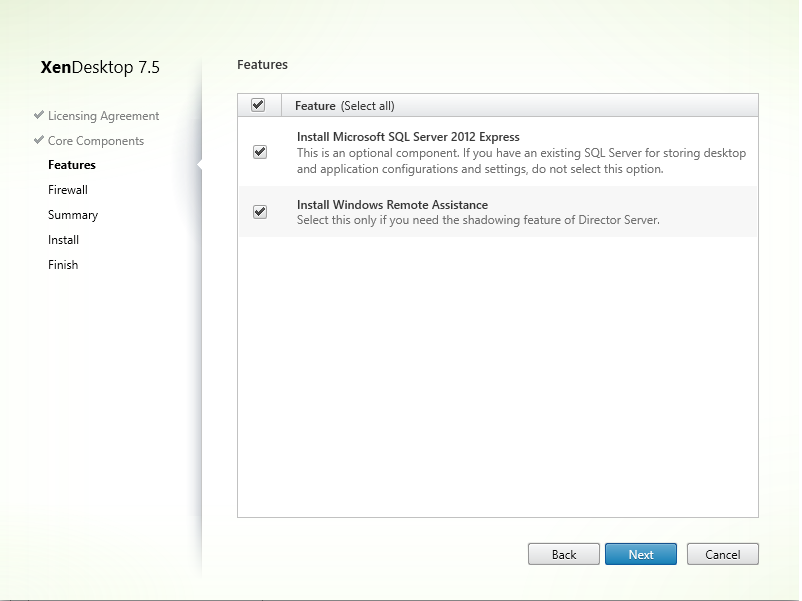
For this lab, we will select all options and click on Next button


We have not any database for this lab than, we will install an Microsoft SQL Server 2012 Express


Select automatically option for Firewall and click on Next button


Review the prerequisites and click on Install button


Finish installation


For XenApp 7.5 basically is the same process.

On the next post, we will try to configure a Desktop to delivery to the user's/device.


sexta-feira, 14 de março de 2014

quinta-feira, 6 de março de 2014

How to create Hyper-V Failover Cluster with SCVMM 2012

After the Hyper-V hosts be configured on your enviroment, it`s time to configure the highly available environment that everyone is demanding in today’s businesses. It`s time for Failover Clustering feature.

The pre-requisites for a HA VMM server installation are:

1. Failover clustering feature added, cluster created and configured (Windows Server 2008 R2 is the minimum OS version supported as node servers)

2. Windows Automated Installation Kit (AIK) for Windows 7 installed on all nodes that will be used as VMM servers: Windows Automated Installation Kit for Windows 7

3. Server and instance name of a SQL Server 2008 or SQL Server 2008 R2 cluster or remote SQL server (best practice to use clustered SQL Server with HA VMM servers)

4. For our DKM (Distributed Key Management) requirement, either logged on, installing VMM with an account that has “edit” permission on the Active Directory container (can be a lower level container doesn’t have to be the root) or DKM group pre-created on Active Directory and its name available to provide at setup (more on DKM requirement later)

Here are the steps to configure the Hyper-V Failover Cluster with SCVMM 2012:

1 - From SCVMM 2012, select Create>Hyper-V Cluster:


2 - Type the Cluster name and select a domain account with privilege to create cluster:


3 - Select a minimum 2 Hyper-V hosts under Available hosts column and move to the Hosts to cluster column:


4 - Enter a static IP address to be used on to the cluster:


5 - Select the disks you want to cluster:


6 - Select the logical networks for creating external virtual switches:


7 - Confirm the settings and click Finish:


After that, that Hyper-V Failover Cluster is configured on SCVMM 2012. You can see the Cluster on SCVMM under servers. See you later to the next post !